Claude Cowork for Small Business: What It Does, What It Touches, and Where to Start
Claude Cowork for small business means giving Claude a whole task, such as closing the month or chasing overdue invoices. Claude then works across your files, your browser and the business apps you connect. This guide explains what it does, what it can reach, what the plans cost and how to start without handing over more than you intend. We have no affiliation with Anthropic, and we have run only one small test on fake data, described below. We have not tested any connector. Every product fact below comes from Anthropic’s or Intuit’s own pages, with the date we read them. Links to our own guides say “our”.
Last verified: 12 November 2026. Prices, counts and features on vendor pages change, so check them before you act.
Key Takeaways
- Cowork is Claude working on a task for you, not just answering in a chat window. Anthropic says “Claude for Small Business” is a plugin you add inside Cowork.
- Anthropic says Claude shows the work and you approve before anything sends, posts or pays. Settings can remove that check, so know which mode you are in.
- You need a paid Claude plan. As of 12 November 2026, Pro is $17 a month billed annually or $20 billed monthly.
- The real risk is not where the task runs. It is what Claude can read and what it can change. Start read-only.
- We ran one small test on fake data with nothing connected (see below). We have not tested any connector, so treat the rest as a map of what the vendors say and check each page yourself before you connect anything that matters.
What Claude Cowork and Claude for Small Business actually are
Claude Cowork is a way of working with Claude where you describe the outcome and Claude carries out the steps. Anthropic’s Help Center says Cowork “uses the same agentic architecture that powers Claude Code, with no terminal required”, and that it can take on multi-step tasks and hand back finished work such as documents, organized files and research.
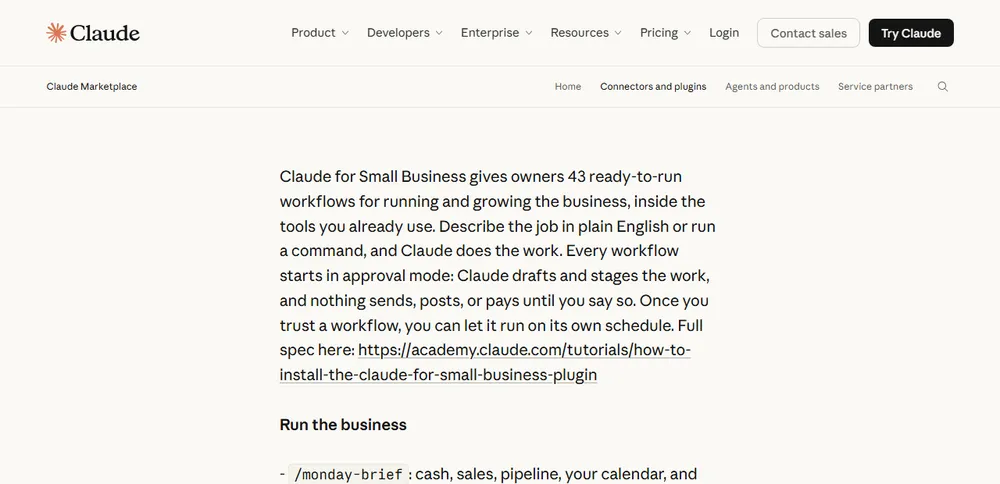
Claude for Small Business is a package built on top of that. Anthropic launched it on 13 May 2026 as “a package of connectors and ready-to-run workflows” for tools small businesses already use. You switch it on inside Cowork, connect your tools and pick a job. It is an Anthropic-verified plugin, which Anthropic describes as pre-built small business workflows where “you approve every step that touches money or customers.”
The size of the package has changed since launch, and many guides still quote the old numbers. Here is what the vendor pages say on the two dates.
| Launch post, 13 May 2026 | Plugin page, read 12 Nov 2026 | |
|---|---|---|
| Ready-to-run workflows | 15 | 43 |
| Named tools | QuickBooks, PayPal, HubSpot, Canva, Docusign, Google Workspace, Microsoft 365 | “37 partner connectors”, including QuickBooks, PayPal, HubSpot, Shopify, Salesforce, Gusto, Square, Stripe, Xero, Canva, Docusign, Google Workspace, Microsoft 365, Slack and Zapier |
Sources: Anthropic launch post and Anthropic plugin page. We did not find an explanation of the difference on either page, so treat both counts as dated snapshots and check the plugin page for the current number.
What it can touch in your business
A connector is what lets Claude reach a business app. Intuit’s own page calls its QuickBooks connector “the QuickBooks app or MCP connection”. MCP, the Model Context Protocol, is the standard way an AI assistant plugs into an outside tool, and we explain it in our guide to MCP servers for small business. What matters for an owner is whether a connector only reads data or can also change it.
Anthropic says “your existing permissions hold”: if an employee cannot see something in QuickBooks or Drive today, they cannot see it through Claude. In Intuit’s walkthrough you also choose which permissions to grant when you connect. Within those limits, the vendors describe a lot of action, not just reading.
| Tool | What the vendor says Claude can do | Can it change things? |
|---|---|---|
| QuickBooks | Fetch reports, import transactions, create, update and email invoices and estimates, send payment reminders, create payment links, update your business profile (Intuit, updated 28 Oct 2026) | Yes. Intuit says an invoice Claude creates “lands in QuickBooks right away” and that deletes need your confirmation. US customers only. |
| PayPal | “Settlements, invoicing, disputes, and refunds” (Anthropic launch post) | Refunds and disputes move money, so check the permission screen when you connect. The launch post does not say what Claude can change. |
| HubSpot | Lead triage, customer pulse, campaign attribution (launch post) | Not stated by the vendor. Our CRM MCP servers guide covers what HubSpot’s own connector can change. |
| Canva | Generates content, edits with your team, “publish assets, and track performance” (launch post) | Publishing is listed, so yes. |
| Docusign | “Sends contracts out for signature, tracks status, and files the executed copy” (launch post) | Yes, it can send. |
| Google Workspace, Microsoft 365 | Listed as supported tools (launch post) | Not stated by the vendor. We did not check what these connectors can change. Our Gmail guide compares the routes. |
One detail from Intuit’s page is worth keeping in mind. It describes the connector used from a chat, and says new invoices appear in QuickBooks immediately, then you review them and ask Claude to send. So “created” and “sent” are separate steps, and checking the draft in QuickBooks before you send is on you.

If a tool you use has no connector, Anthropic says most workflows still run if you upload a spreadsheet or statement, and a build-connector skill can link a tool through Zapier. Our best MCP servers for small business post lists which official connectors exist for common tools.
Cowork, chat or Claude Code: which one do you need?
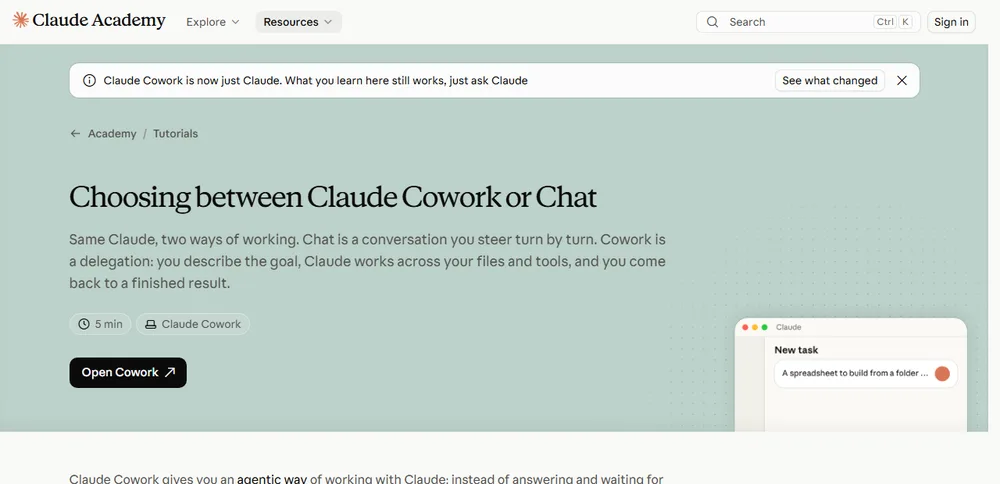
Anthropic’s Academy puts it simply: chat is a conversation you steer turn by turn, and Cowork is a delegation where you describe the goal and come back to a finished result.
| Chat | Cowork | |
|---|---|---|
| Best for | One-off questions, thinking out loud | A clear deliverable that touches your files or tools |
| Your role | Present for every turn | Describe it once, check back |
| Output | Text you read or copy | A finished file or an action taken |
Source: Anthropic Academy, “Choosing between Claude Cowork or Chat”, read 12 November 2026.
This choice is already changing. Anthropic’s Help Center says it is merging chat and Cowork into one conversation, so you no longer pick a mode first. The change is rolling out gradually, starting with Pro, Max and Ultra plans, and if your message box still shows “Chat” and “Cowork”, you do not have it yet.
Two more details from Anthropic’s Help Center:
- Since 6 October 2026, new Cowork tasks on Pro, Max and Ultra plans run in the cloud, so work continues if you close your laptop.
- Anything that touches files or the browser on your computer needs the Claude Desktop app open.
Claude Code is the coding tool whose engine Cowork shares. This guide does not cover it, and you may not need it unless a developer on the team does.
Which plan do you need, and what does it cost?
Cowork needs a paid Claude plan. The cheapest is Pro, at $17 a month billed annually or $20 billed monthly (read 12 November 2026). According to Anthropic’s Help Center, Cowork on desktop is on all paid plans. On web and mobile it is on Pro, Max, Ultra and Team (in beta on Team), and on Enterprise when an owner enables it. The desktop app is listed for macOS, Windows and Linux (beta).
Prices below are from Claude’s pricing page, read on 12 November 2026. They change, so check the page before you buy.
| Plan | Price |
|---|---|
| Pro | $17 a month billed annually ($200 up front), or $20 billed monthly |
| Max | $100 a month |
| Ultra | $200 a month |
| Team, standard seat | $20 a seat a month billed annually, or $25 billed monthly |
| Team, premium seat | $100 a seat a month billed annually, or $125 billed monthly; the page says 5x more usage than a standard seat |
The Team plan is listed “for teams of 2 to 150”. We did not find a separate fee for the Claude for Small Business plugin on the pages we read. We also do not quote usage limits, because the pricing page describes usage in relative terms. Your connected tools carry their own costs: QuickBooks, PayPal, HubSpot and the rest need their own subscriptions. For Intuit’s connector you need an active QuickBooks or Intuit Enterprise Suite subscription for live data, or you can paste or upload transactions without one.

Is it safe to connect your business tools?
Short answer: it is as safe as the access you give it. Anthropic’s safety article says that when something goes wrong, the impact “depends almost entirely on two things: what Claude can read and see, and what Claude is allowed to do.” So start read-only, use manual approval and connect one tool at a time.
It separates two kinds of tools. Read tools let Claude look at content, such as your inbox. Write tools let it act, such as creating a calendar invite, deleting a file or clicking on the screen. Write tools carry more risk, which is why Anthropic recommends human oversight for high-stakes work.
The main attack it describes is prompt injection: instructions hidden in something Claude reads, such as an email or a web page, that try to steer it. Anthropic says an attack needs two things at once, Claude reading information outside your trusted boundary and Claude being able to take actions that could hurt you. Remove either and the attack gets harder. That is the idea behind everything in the first-week plan below.
Other points from Anthropic’s safety article that matter to an owner:
- Cloud isolation does not limit what Claude reads. Cowork tasks run in an isolated environment on Anthropic’s servers, but “it doesn’t change what Claude can read or do through the access you’ve granted.”
- Scheduled tasks run unattended. Anthropic’s advice is to start with low-risk tasks, avoid sensitive data and consequential actions, and review output after each run.
- Plugins widen the reach. Installing one “can significantly expand Claude’s scope of action”, so stick to verified ones and read the permissions first.
- Computer use has no sandbox. Claude clicks and types on your screen directly, so Anthropic suggests starting with low-stakes tasks and blocking sensitive apps.
- Approval modes differ. In “Automatically approve” mode Claude screens each action; in “Skip all approvals” nothing checks it. Claude always asks before permanently deleting files.
- The risk is not zero. Anthropic writes that “the chances of an attack are still non-zero.”
Anthropic’s launch post also says that in its own survey, half of small business owners named data security as their biggest hesitation about AI, and that it does not train on your data by default on Team and Enterprise plans. Intuit says QuickBooks data is not used to train Claude. We did not verify compliance terms for regulated data, so if you handle health or similar records, ask Anthropic and your adviser first.
The same logic applies to every connector, not only Claude’s. Our MCP security checklist for small business walks through permission levels and offboarding, and if you are weighing Claude against an open-source agent, our Claude Cowork vs OpenClaw comparison puts them side by side and our OpenClaw safety post covers that tool’s risks separately. For a prompt-by-prompt checklist of what to approve and what to refuse, see our owner checklist: is Claude Cowork safe for business.

What happened when we tried it
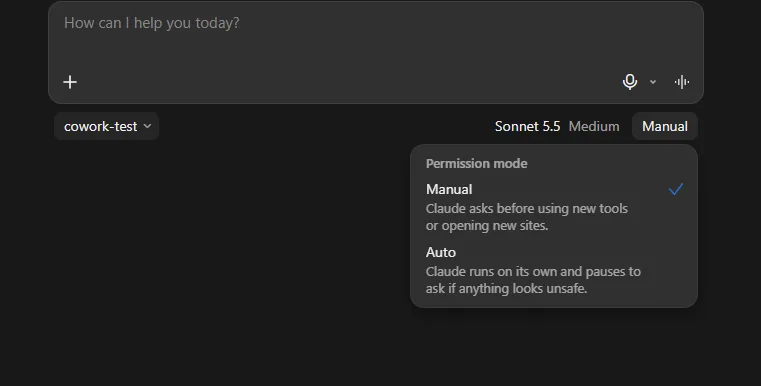
On 12 November 2026 we ran one small test on a Pro plan in the Claude Desktop app on Windows. Our account showed the new combined experience, with no separate “Cowork” option. We used a made-up bank export for a fictional coffee roaster: 40 invented transactions for October 2026 in a CSV file, in a new empty folder, with no apps connected. The permission mode was Manual, which the menu describes as “Claude asks before using new tools or opening new sites.” The model setting was Sonnet 5.5, Medium. The prompt was: “Read the CSV file in this folder. Write a profit and loss summary for October 2026 as a new document in this folder. Group the transactions into sensible categories and show the totals.”
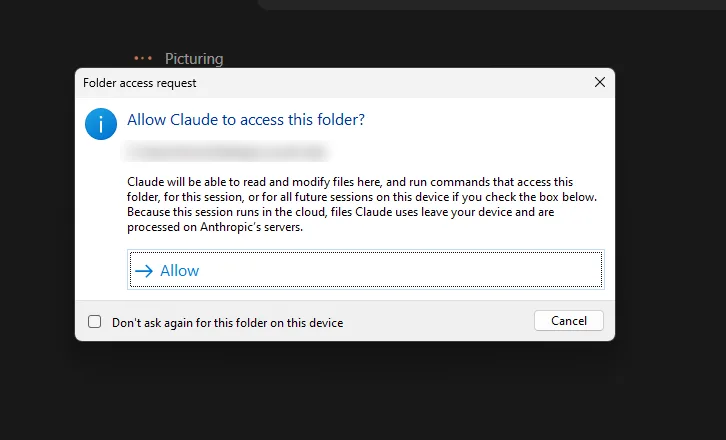
Two folder prompts. Choosing the folder in the message box first asked us to give Claude access to it. We did not capture that first prompt, so we do not quote it. After we sent the prompt, a second dialog appeared that asked “Allow Claude to access this folder?” and said Claude would be able to “read and modify files here, and run commands that access this folder”. It also said that because the session runs in the cloud, “files Claude uses leave your device and are processed on Anthropic’s servers.” A tick box offered to stop asking for that folder on later sessions. It was unticked when we captured the prompt.
The result. After about five minutes, Claude had written a Word document with a profit and loss summary and a reconciliation to the bank balance. We checked every figure against our own answer key, built before the test:
- Net revenue ($36,749.00), cost of goods ($4,822.90) and every expense category matched to the cent.
- It reported net operating profit of $22,724.93. Our key says $22,763.93. The $39.00 difference is one subscription charge that appeared twice on the same day. Claude counted both, but flagged the second one in the document as a possible duplicate worth disputing.
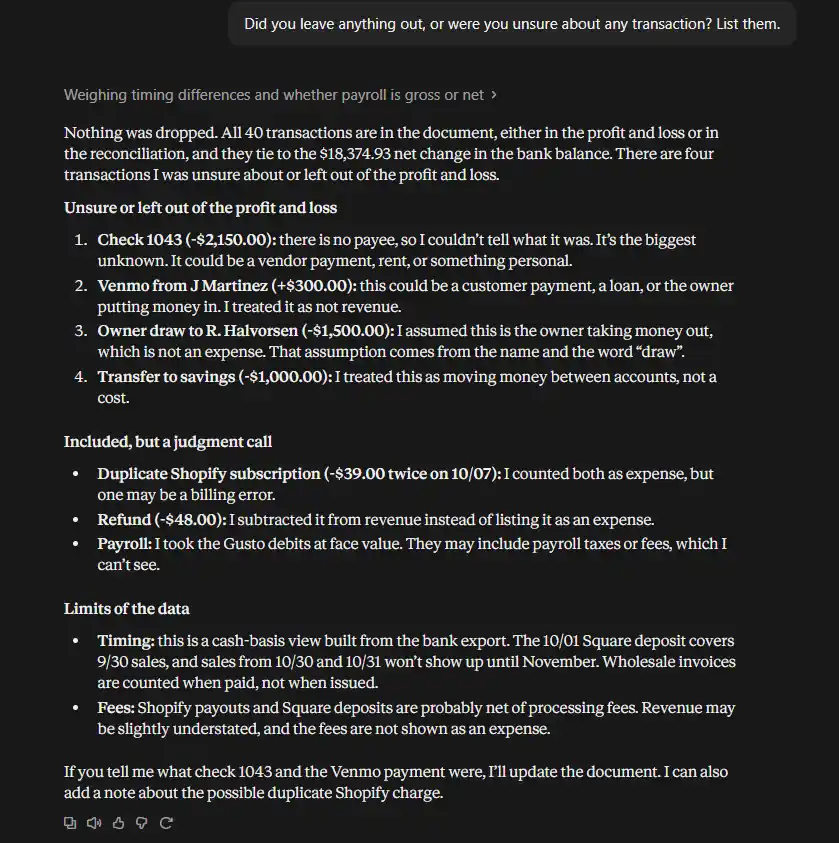
- It left four items out of the profit and loss and listed them: a $2,150.00 check with no payee, a $300.00 Venmo deposit with no stated purpose, an owner draw and a transfer to savings. It reconciled all 40 transactions to a $18,374.93 change in the bank balance, which we recomputed from the file and found correct.
- For the unknown check and the Venmo deposit, it showed what profit would be under each reading instead of guessing.
When we asked “Did you leave anything out, or were you unsure about any transaction? List them.”, Claude listed those items again, and added its own caveats: the figures are cash-basis, payroll might include taxes it could not see, and payout deposits are probably net of processing fees.
The original file was unchanged (we compared file hashes), and the new document was the only file Claude added to the folder.
What this does not show. It was one job, one run, on invented data. We did not test QuickBooks or any other connector, scheduled tasks, computer use or a Team plan. Results can differ on another run or with real, messier books. We knew the answers in advance, which a real owner will not, so the checking step is yours.
Is Claude Cowork worth it for a small business?
Short answer: it looks worth starting if you already use a supported tool and will review every draft before it goes out. We cannot promise a result, because we have not run it on a real business. What we can do is match the documented features to common situations.
It looks worth starting if:
- You already use QuickBooks Online, HubSpot, PayPal or another supported tool, and repeat the same paperwork every week or month.
- You are willing to read what Claude drafts before it goes out.
- You can begin with read-only jobs such as summaries and reports.
Wait, or start much smaller, if:
- Nobody will review the output. Anthropic’s own advice is to match oversight to the stakes.
- Your important files are financial documents or credentials you cannot keep out of a shared folder. Anthropic says to avoid granting access to local files with sensitive information.
- Your tools are not supported. Intuit’s connector is US only, and it describes QuickBooks Online and Intuit Enterprise Suite.
- You handle regulated data and have not checked the vendors’ terms.
A safe first week
This plan follows Anthropic’s safety guidance. Adjust it to your business.
- Make one working folder. Anthropic suggests a dedicated folder instead of broad access, and backups of anything Claude can change. When we granted a folder in our own test, one prompt said Claude could “read and modify files here”, so even a read-only job gets write access to that folder.
- Pick one read-only job. A weekly summary or a report that only reads data. Do not start with sending, paying or deleting.
- Use manual approval. Anthropic recommends “Manually approve” when a task touches sensitive accounts, a new tool or anything hard to undo.
- Connect one tool at a time. At the connector screen, grant only the permissions the first job needs.
- Check every draft before it leaves. For QuickBooks, open the new invoice in QuickBooks and confirm it first, as Intuit advises.
- Hold off on scheduling. Run the job by hand for a few weeks before you let it run on a schedule, and never schedule sensitive tasks you cannot watch.
- Review and expand slowly. After a week, read what it did and decide whether to add one more job or one more connector.
Frequently asked questions
Do I need the Claude for Small Business plugin to use Cowork?
No. Cowork works on paid plans on its own. The plugin is an add-on you install inside Cowork for the ready-made small business workflows.
Does the plugin cost extra?
We did not find a separate plugin fee on Anthropic’s plugin page or launch post. Check before you install, and remember your connected tools have their own subscriptions.
Can Claude send emails or take payments without my approval?
Anthropic says the plugin’s workflows start in approval mode, where nothing sends, posts or pays until you say so, and that once you trust a workflow you can let it run on a schedule. In Cowork’s own settings, “Skip all approvals” removes the check. Which mode you choose decides the answer.
Do I need to know how to code?
No. Anthropic describes Cowork as having no terminal required. You describe the job in plain English.
Does it work on Windows?
Anthropic’s Help Center lists Claude Desktop for macOS, Windows and Linux (beta), and says local file access and browser use need the desktop app open.
Sources and dates
All pages read on 12 November 2026. Re-verify before 12 December 2026, because plans, counts and features change.
- Anthropic, “Introducing Claude for Small Business”, published 13 May 2026
- Anthropic, Claude for Small Business plugin page
- Anthropic Claude Help Center, “Use Claude Cowork safely”
- Anthropic Claude Help Center, “Get started with Claude Cowork”
- Anthropic Claude Help Center, “Use Claude Cowork on web, desktop, and mobile”
- Anthropic Claude Help Center, “Claude Cowork and chat are one Claude”
- Anthropic Academy, “Choosing between Claude Cowork or Chat”
- Anthropic Academy, “How to install and use the Claude for Small Business plugin”
- Claude pricing
- Intuit, “Use Claude to enter transactions and get insights in QuickBooks”, updated 28 October 2026