Claude Cowork vs OpenClaw for a Small Business: Which Is Safer to Start With?
Claude Cowork vs OpenClaw mostly comes down to who will look after the tool. For most small businesses with no technical person, Claude Cowork is the safer one to start with, because you can require approval for actions (you have to switch that on) and it reaches your local files only in the folders you connect. OpenClaw can be a sound choice too, but its own documentation describes a setup where one trusted operator runs everything and commands run without approval prompts. In our judgment that makes it only as safe as whoever configures it. Neither is risk free.
How we checked: every product fact comes from the vendors’ own pages, read on 17 November 2026 (Anthropic’s Cowork safety article on 16 November). We did not test OpenClaw, and we leave out the viral numbers that no official page backs.
Last checked: 17 November 2026. Vendor pages change, so check them before you act. We plan to re-check by 12 December 2026.
Key Takeaways
- Our verdict: pick Claude Cowork unless a technical person will own OpenClaw. Start with Claude Cowork if nobody technical will own the setup. Switch it to “Manually approve”, because Anthropic says new tasks start in “Automatically approve” mode by default on Pro, Max, Ultra and Team plans.
- OpenClaw’s docs describe a trusted single-operator default where commands run on your computer without approval prompts, and sandboxing is off by default.
- Cowork costs $20 a month on Pro, or $17 a month if billed annually. OpenClaw is free software, and you pay the AI provider you connect plus any hosting. No official monthly figure exists.
- We did not test OpenClaw. Whether you may run it on a Claude subscription login is not stated on the Anthropic pages we read.
Claude Cowork vs OpenClaw at a glance
Two terms first, because OpenClaw’s docs use them. The Gateway is the background program that connects your chat apps and tools. A sandbox is a walled-off space where commands run, so a mistake does less damage.
Our pick for most owners is Claude Cowork. This table compares OpenClaw vs Claude Cowork on the differences that drive that pick, and each row names its official source.
| Question | Claude Cowork | OpenClaw | Source |
|---|---|---|---|
| Who runs it? | Anthropic’s product. Tasks run in an isolated, temporary cloud environment and reach your local files through the Claude Desktop app, only in folders you connect | Open-source software that “runs on your own computer”, stewarded by an independent non-profit, the OpenClaw Foundation | Anthropic safety article; OpenClaw README |
| How hard is setup? | Install the desktop app on a paid plan | Command-line install, or a Windows desktop app that the docs call the easiest desktop route. Needs a current Node.js version for the command-line route and a model login or API key. Docs say about 5 minutes to a first chat | OpenClaw getting started |
| What can it touch? | Local files in connected folders. Browsing, computer use and connectors can reach more, and computer use asks permission before each app | The assistant “can execute arbitrary shell commands, read/write files, access network services, and send messages to anyone (if given channel access)” | OpenClaw trust model |
| Who approves what? | You choose an approval mode (see our Cowork safety checklist). Permanent deletion always asks | Trusted single-operator default allows host commands without approval prompts. Sandboxing is off by default | OpenClaw sandboxing |
| Who is responsible? | Anthropic: “You remain responsible for all actions taken by Claude performed on your behalf” | The docs treat whoever runs the Gateway as a trusted operator. One Gateway is one trust boundary | Anthropic safety article; OpenClaw security guide |
| What does the software cost? | Pro $20 a month, or $17 a month billed annually; Team seats from $20 | “No paid tier, hosted service, or token”. You pay your AI provider and any hosting | Anthropic pricing; OpenClaw README |
What each tool is, in owner terms
Claude Cowork is Anthropic’s agent inside the Claude Desktop app. Your task runs in the cloud, and Claude reaches your files through the app for the folders you have connected. Anthropic says local files it opens are processed on its servers rather than staying on your computer. Our guide to Claude Cowork for small business covers what it does day to day.
OpenClaw is open-source software you install on your own computer or server. It answers you in chat apps you already use, such as WhatsApp, Slack or Telegram, and you choose the AI model provider. The README says its state, memory and credentials live on your hardware, while your prompts go to the model provider and chat platforms you configure. It uses an MIT licence and, per the README, has “no paid tier, hosted service, or token”.
Which is safer to start with?
For most owners it is Claude Cowork, and the reason is what each tool does if you change nothing.
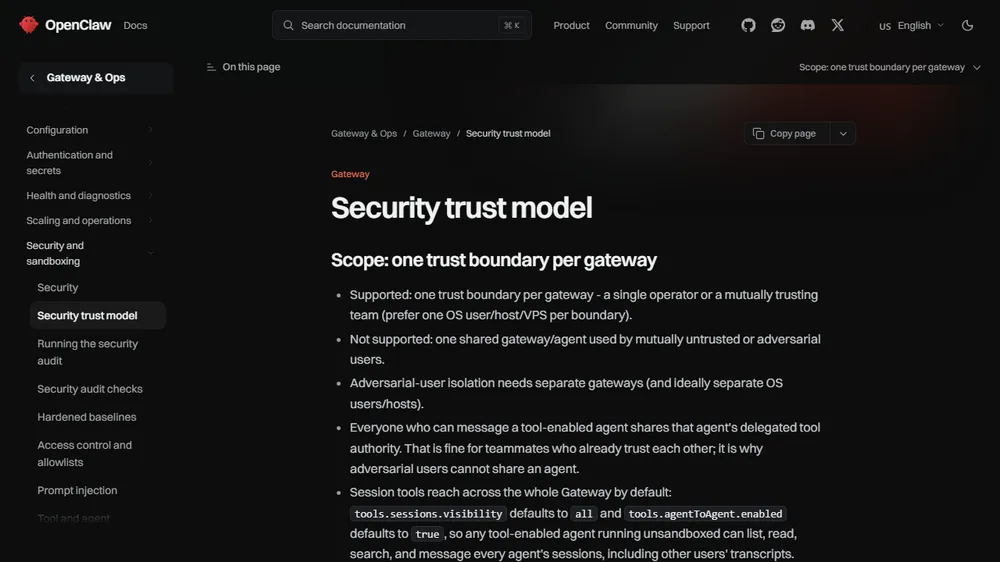
What OpenClaw documents. Its trust model says the “trusted single-operator default” allows host commands “without approval prompts”, and calls that “intentional UX”. Sandboxing is “off by default”, and the docs add that it is “not a perfect security boundary”. The README says tools run on the host for the main session unless you configure sandboxing. In fairness, there are safe defaults too: on a regular install the Gateway listens only on your own machine, most chat channels answer an unknown direct-message sender with a pairing code (the docs list a few exceptions, so ask your contractor to check each channel), and one command, openclaw security audit, checks whether you have drifted from those defaults. The docs also say most failures are simple: “someone messaged the bot and the bot did what they asked.”
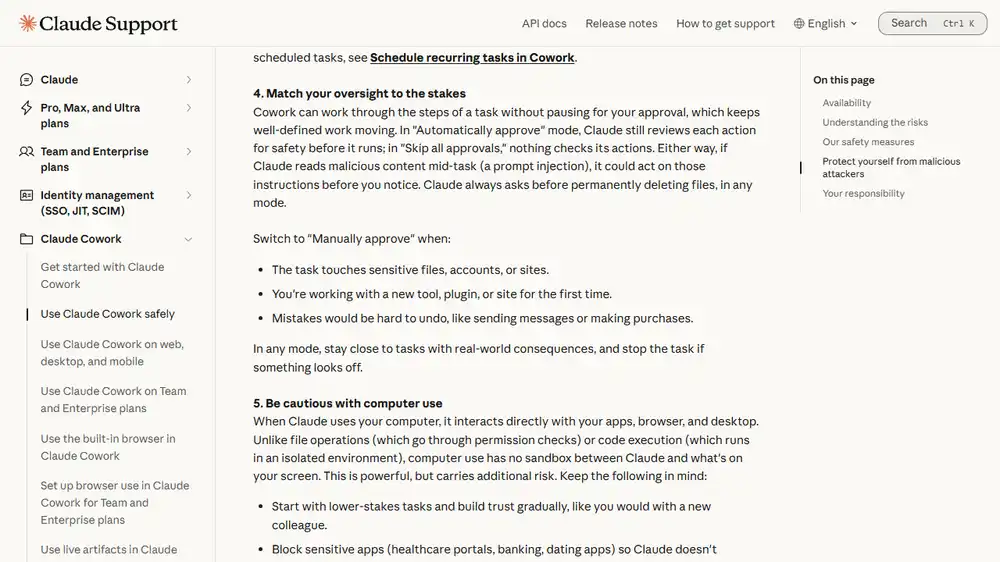
What Anthropic documents. Anthropic says the impact of a mistake or attack depends “almost entirely” on what Claude can read and what it is allowed to do. You can pick Manually approve for anything touching money or customers, and Claude always asks before permanently deleting files, in any mode. The catch, which we explain in our Cowork safety checklist, is that, per Anthropic’s Team and Enterprise article, new tasks start in Automatically approve on Pro, Max, Ultra and Team plans, so you have to change the mode yourself.
Neither tool removes prompt injection, where hidden instructions in an email or web page steer the AI. Anthropic says the chances of an attack are “still non-zero”. OpenClaw’s README tells you to treat inbound messages as untrusted input.
Responsibility. With Cowork, Anthropic says you remain responsible for what Claude does. OpenClaw has no paid tier or hosted service, so in our reading the setup and upkeep sit with you or your contractor.
Three questions to choose
Choosing Cowork or OpenClaw for business comes down to these questions. The path is our judgment, built on both vendors’ pages.
- Will someone technical own the setup, the updates and the security checks? If no, choose Claude Cowork. If yes, either can work, so keep going.
- Will it touch customer or financial data? If yes, choose Cowork in Manually approve mode, using copies of files. Consider OpenClaw only with sandboxing on, an audit run and your contractor’s sign-off. In either tool, keep real customer records out for the first month.
- Do you need it reachable from your chat apps, or running while your computer is off? Anthropic’s safety article says scheduled Cowork tasks run in the cloud even when your computer is off, but it also advises against scheduling tasks that touch sensitive files or take actions that are hard to undo. OpenClaw is built to answer in chat apps from your own devices. Choose OpenClaw for the chat-app case only if question 1 was a yes.
If you have an IT contractor
OpenClaw becomes a reasonable choice when a named person owns it: sandboxing is on, the security audit has been run and fixed, and one trust boundary covers everyone who can message it. The docs say OpenClaw “is not a hostile multi-tenant security boundary”, so do not share one agent between people who do not trust each other. Our OpenClaw security checklist lists the steps, and OpenClaw’s own security guide explains the defaults.
Questions to hand over (ours, built on OpenClaw’s docs):
- Who owns updates, and how will we hear about security fixes? The getting-started page recommends newer Node versions “for the security fixes”.
- Is sandboxing on, and for which tools?
- Who can message the agent, and are unknown senders paired or blocked?
- What does
openclaw security auditreport on our setup? - Where are the AI provider keys and chat logins stored, and who can read that computer?
- Is the Gateway reachable only from this machine? Container images default to an exposed address, per the docs.
If customer data is involved
Anthropic advises avoiding access to local files with sensitive information, such as financial documents, and using a dedicated working folder. OpenClaw’s trust model says everyone who can message a tool-enabled agent shares that agent’s delegated tool authority, so a customer-facing chat channel is a risk in itself. We would keep out financial records, passwords, customer lists and signed contracts, and our Cowork checklist covers the folder rules.
On training, Anthropic’s pricing page lists model training as “Opt-out” on the individual plans (which we read as training being on unless you switch it off) and “None by default” on Team. For OpenClaw, your prompts go to the model provider you configure, so that provider’s terms apply, and we did not review them.
What each costs, checked 17 November 2026
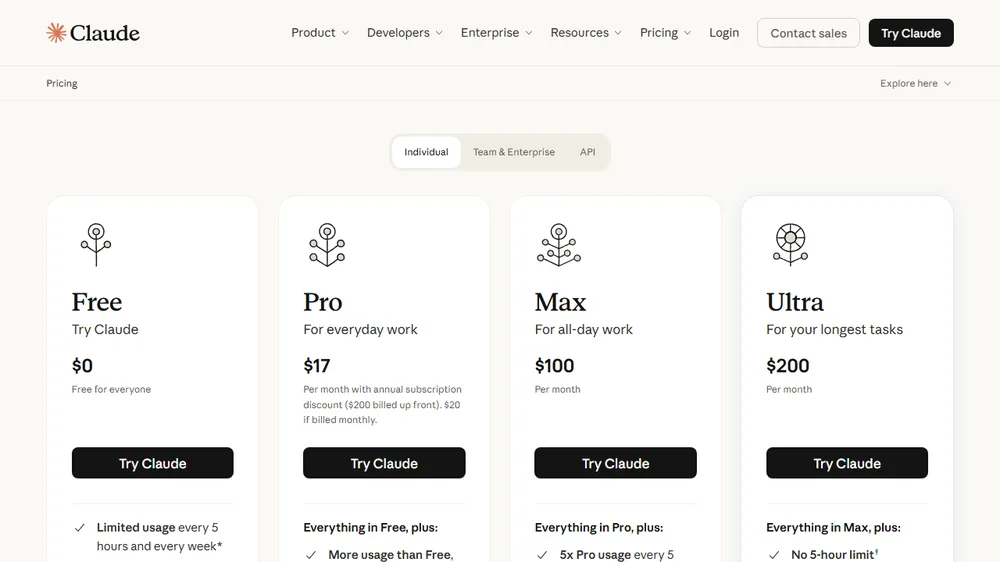
Anthropic’s pricing page lists Claude Pro at $20 a month if billed monthly, or $17 a month with annual billing ($200 up front). Team standard seats are $25 per seat a month billed monthly or $20 billed annually, for teams of 2 to 150. Cowork is on desktop on all paid plans, and Anthropic says prices are subject to change.
OpenClaw’s software has no paid tier. You pay for AI usage with the provider you connect and for any server you rent. No official page gives a monthly range, so we publish none. Our OpenClaw setup guide has a cost table built on labelled assumptions of ours.
Can you run OpenClaw on your Claude subscription?
We could not settle this one. Neither Anthropic page we read names OpenClaw, so whether a subscription login inside OpenClaw is allowed is not stated. OpenClaw’s getting-started page says you need “An existing Claude Code or Codex CLI login, or a provider API key”. Here is what Anthropic does say:
- Its Claude Code sign-in “is intended exclusively for purchasers of Claude Free, Pro, Max, Ultra, Team, and Enterprise subscription plans” for “ordinary use of Claude Code and other native Anthropic applications”.
- Developers building products “should use API key authentication”.
- Anthropic “does not permit third-party developers to offer Claude.ai login into their own applications, or to route requests through Free, Pro, Max, or Ultra plan credentials on behalf of their users”.
- Its Usage Policy lists services that “route requests through consumer subscriptions” under platform abuse.
The same page says its rules do not prevent “an end user from signing in to the unmodified Claude Code binary with their own Claude subscription”. That sentence is about Claude Code itself, not OpenClaw, so we would not read it as permission. Our advice: use an API key billed to your own account, or ask Anthropic before you rely on a subscription login. Their Claude Code legal page is the one to read.
What we could not verify
- Skill and exposure statistics. Third-party posts quote counts of malicious OpenClaw skills and exposed servers. The numbers disagree and none is linked to an official page, so we left them out.
- Bans and compliance claims. We found no official source for reports of a government ban, and vendor claims of SOC 2 or HIPAA compliance are the vendors’ own statements.
- “Cowork has no audit log.” Anthropic’s pricing page lists audit logs and the Compliance API as Enterprise features, and its safety article says Team and Enterprise owners can stream Cowork events to their own monitoring tools. We did not test either.
- OpenClaw’s real monthly cost. It depends on the model provider, how much you use it and your hosting.
- Our testing. We did not test OpenClaw. The only hands-on test behind this cluster is our one fake-data Cowork run on 12 November 2026.
Questions owners ask
Is Claude Cowork better than OpenClaw for a small business?
For most owners without a technical person, yes, in our judgment. You can require approval (you have to switch that on), and it reaches your local files only in the folders you connect, although browsing, computer use and connectors can reach more. If someone technical will own OpenClaw’s setup, the answer is closer to a tie.
Is OpenClaw safe for business?
It can be, if configured carefully, but the safety work is yours. Its docs warn that anyone who can message the agent can try to trick it. Our is OpenClaw safe for business guide explains when not to use it.
Can I use both?
Nothing we read says you cannot, and we have not tested it. Start with one tool, one folder or channel and fake data, and add the second only when the first is under control.
How much does each one cost per month?
Claude Pro is $20 a month if billed monthly, or $17 a month billed annually, and Team standard seats are $25 monthly or $20 annually, according to Anthropic’s pricing page. OpenClaw’s software has no paid tier, so you pay the AI provider you connect and any hosting. No official page gives a monthly range for that, so we publish none.
Does Cowork keep working when my computer is off?
Scheduled Cowork tasks do, because Anthropic says they run in the cloud. Anthropic also advises against scheduling tasks that touch sensitive files or take actions that are hard to undo. OpenClaw runs on your own computer or server, so in our reading it is available only while that machine is on.
Do I need an IT person to run OpenClaw?
The docs describe a command-line install (with a Windows desktop app as the easiest desktop route), a Node.js version requirement and hardening steps. Our view is that you should either be comfortable with those or have someone who is.
Next step
Answer the three questions above. If you choose Cowork, run the checklist in our safety guide. If you choose OpenClaw, run the security checklist first. Then follow the first-week plan in our guide to Claude Cowork for small business.